
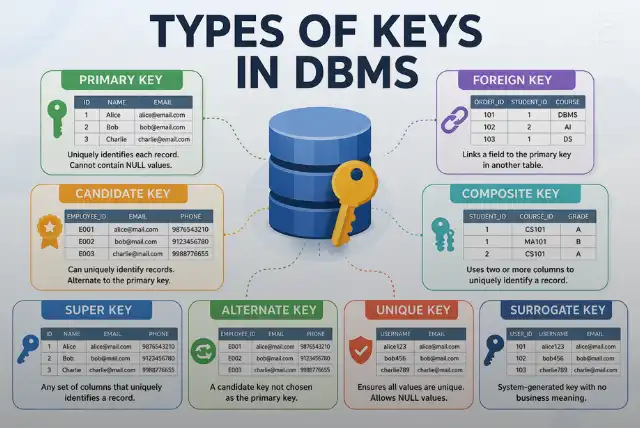
The types of keys in DBMS are the super key, candidate key, primary key, alternate key, foreign key, composite key, unique key and surrogate key. A key is a column, or a group of columns, that identifies a row in a table or links one table to another. This guide explains all eight using one small example table, so you can see how they fit together instead of learning eight separate examples.
Most tutorials change the example for every key, which is why the topic feels harder than it is. Here, every key is simply a different question asked about the same STUDENTS table. You will also get the NULL rules that many guides get wrong, a worked count of super keys, and one SQL script that contains every key.
| Topic | Keys in relational databases (DBMS) |
| Keys covered | Super, candidate, primary, alternate, foreign, composite, unique, surrogate |
| Method | One STUDENTS table used for every definition |
| Best for | Exams, interviews and first real schema designs |
| Includes | Diagrams, charts, NULL rules by database, SQL example, common mistakes |
The 8 Types of Keys in DBMS at a Glance
| Key | Plain-English meaning | In our example |
|---|---|---|
| Super key | Any set of columns that identifies a row, even with spare columns | {StudentID, Name}, {Email, DeptID} |
| Candidate key | A super key with nothing left to remove | StudentID, RollNo, Email |
| Primary key | The candidate key you choose as the main row identifier | StudentID |
| Alternate key | A candidate key that was not chosen as primary | RollNo, Email |
| Foreign key | A column that points to the primary key of another table | DeptID |
| Composite key | A key made of two or more columns used together | {StudentID, CourseID} in ENROLMENTS |
| Unique key | A UNIQUE rule on a column that is not the primary key | |
| Surrogate key | A made-up ID with no real-world meaning | StudentID (auto-generated) |
What Is a Key in DBMS, and Why Do Keys Matter?
A key is a rule about which columns identify a row. Databases need these rules for three reasons.
- Exact identification: two students called Ben Cole must never be confused with each other.
- Relationships: keys are how one table points at rows in another, which is what makes a database “relational”.
- Protection and speed: the database refuses duplicate or orphaned rows, and primary and unique keys are backed by indexes. In PostgreSQL, for example, adding either one automatically creates a unique index.
One Table, Every Key: Meet STUDENTS
Our example is a university database. Here is the STUDENTS table: three rows, five columns.
| StudentID | RollNo | Name | DeptID | |
|---|---|---|---|---|
| 1001 | CS-24-001 | asha@uni.ac.uk | Asha Patel | D01 |
| 1002 | CS-24-002 | ben@uni.ac.uk | Ben Cole | D01 |
| 1003 | ME-24-001 | ben.c@uni.ac.uk | Ben Cole | D02 |
One rule applies to everything below: keys come from the design, not from the rows you happen to have today. The pair {Name, DeptID} is unique in these three rows, but nothing stops two Ben Coles joining the same department next year. So we do not treat it as a key. A key is a promise about every future row, not a pattern in today’s data.
Super Key: Any Column Set That Identifies a Row
A super key is any set of columns that uniquely identifies a row. It may carry unnecessary extra columns. In our table, {StudentID} is a super key, and so are {StudentID, Name}, {Email, DeptID} and the full set of all five columns.
How many super keys does our table have? A column set is a super key if it contains at least one candidate key. Our three candidate keys are single columns (StudentID, RollNo and Email), so only column sets that avoid all three fail. Those are the four subsets of {Name, DeptID}: the empty set, {Name}, {DeptID} and {Name, DeptID}. With 5 columns there are 25 = 32 subsets, so the table has 32 – 4 = 28 super keys. The general formula for m single-column candidate keys in a table of n columns is 2n – 2n-m.
The count grows fast. If one column is a key by itself, a table with n columns has 2n-1 super keys, because each of the other columns can be included or left out. That is why nobody lists super keys in practice: they are a stepping stone to the useful ones, the candidate keys.
Candidate Key: The Minimal Ones
A candidate key is a super key with nothing spare: remove any column and it stops being unique. Our table has three, StudentID, RollNo and Email. {StudentID, Name} is not a candidate key because Name adds nothing; StudentID already does the job alone. Every candidate key is a super key, but most super keys are not candidate keys. Candidate keys are so called because each one is a candidate for the primary key job.
Primary Key: The One You Choose
The primary key is the candidate key you promote to be the table’s main identifier. The rules are strict:
- A table has at most one primary key, although that one key can span several columns.
- Its values must be unique and never NULL.
- It should rarely or never change, because other tables will point at it.
- It is the default target for foreign keys that reference the table.
Our sensible choice is StudentID. Emails change when people graduate, and roll numbers can be restructured, but a system-issued ID stays the same for life. The PostgreSQL documentation notes that a primary key forces its columns to be NOT NULL and automatically creates a unique index.
Alternate Key: The Runners-Up
Candidate keys that do not become the primary key are alternate keys. Once StudentID is primary, RollNo and Email are the alternates. They stay unique and are still useful: the login screen can find a student by Email, the exam office by RollNo, while the database joins everything on StudentID. In SQL you enforce alternate keys with UNIQUE constraints. Some books call them secondary keys.
Foreign Key: The Link Between Tables
A foreign key is a column whose values must match the primary key (or a unique key) of another table. DeptID in STUDENTS is a foreign key pointing at DEPARTMENTS:
| DeptID | DeptName |
|---|---|
| D01 | Computer Science |
| D02 | Mechanical Engineering |
The database enforces referential integrity: you cannot give a student a DeptID that does not exist in DEPARTMENTS. Key points to remember:
- Foreign key values can repeat. Two students sit in D01, and that is fine. Uniqueness is the parent table’s job.
- A foreign key can be NULL unless you also declare the column NOT NULL.
- A table can reference itself, for example an employee table where a manager column points back at the employee ID.
What happens when someone deletes a department that students still point at? It depends on the ON DELETE action you choose. These are the options described in the PostgreSQL documentation, and the same ideas exist in most systems, though support varies, so check yours.
| ON DELETE action | What happens to the child rows |
|---|---|
| NO ACTION (default) | The delete is checked against the rule and normally fails with an error |
| RESTRICT | The delete is blocked straight away, with no deferral |
| CASCADE | The child rows are deleted as well |
| SET NULL | The foreign key column in child rows becomes NULL |
| SET DEFAULT | The foreign key column falls back to its default value |
Composite Key: When One Column Is Not Enough
A composite key uses two or more columns together because no single column is unique on its own. The classic home for one is a link table. Students take many courses and courses have many students, so an ENROLMENTS table records each pairing:
| StudentID | CourseID | Mark |
|---|---|---|
| 1001 | CS101 | 68 |
| 1001 | MA102 | 72 |
| 1002 | CS101 | 55 |
StudentID repeats and so does CourseID, but each pair appears once. So {StudentID, CourseID} is the primary key, and each half is also a foreign key (to STUDENTS and COURSES). Two columns in a link table is normal. Keys of three or four columns that other tables must also reference get awkward, and a single surrogate ID is often simpler.
Unique Key: The Constraint Version
In SQL, “unique key” usually means a UNIQUE constraint on a column that must not repeat but is not the primary key. Email is the classic case: two students cannot register the same address, while StudentID stays the primary key. This is how alternate keys are enforced in real databases.
| Point | Primary key | Unique key |
|---|---|---|
| How many per table | One | As many as you need |
| NULL values | Never allowed | Allowed, but how many depends on the database (next table) |
| Purpose | Main identity of the row | Other values that must not repeat |
| Can foreign keys point at it? | Yes, it is the default target | Yes, in PostgreSQL a foreign key may reference a unique constraint |
The NULL rule is where many guides slip. They say a unique key allows “one NULL”, which is true for SQL Server but not for every database. The SQL standard leaves this behaviour to each implementation, so the answer changes with the system you use:
| Database | Several NULLs in a UNIQUE column? |
|---|---|
| PostgreSQL | Yes by default, because two NULLs are not treated as equal. Adding NULLS NOT DISTINCT changes this |
| MySQL | Yes, a UNIQUE index permits multiple NULLs |
| Oracle | Yes, a single-column unique key can contain NULLs |
| SQL Server | No, only one NULL is allowed per column |
The safest design is to add NOT NULL to any unique column that should always have a value, such as Email. Then the question never arises. Sources for this table: the PostgreSQL, MySQL, Oracle and SQL Server documentation.
Surrogate Key: The Made-Up Number
A surrogate key is an identifier with no real-world meaning, created only to be the primary key: an auto-incrementing number, a sequence value or a UUID. Our StudentID is one. The number 1001 says nothing about Asha, which is its strength, because facts about people change and meaningless numbers do not. The opposite is a natural key, a real-world value such as an email address or a national insurance number used as the key.
| Point | Natural key | Surrogate key |
|---|---|---|
| Meaning | Real-world value people recognise | None, just an ID |
| Stability | Can change (emails, names, codes) | Never needs to change |
| Size | Can be long | Usually a small integer |
| Extra cost | None | One extra column and index |
| Duplicate risk | Protected by the key itself | Real-world duplicates slip in unless you add a UNIQUE constraint |
A common modern pattern is a surrogate primary key plus UNIQUE constraints on the natural candidates, which is exactly what our STUDENTS table does. It is not the only valid choice. As the Agile Data essay on keys points out, neither natural nor surrogate keys suit every situation.
All Eight Keys Compared
| Key | Unique? | NULL allowed? | How many per table? |
|---|---|---|---|
| Super key | Yes | Depends on the columns | Many (28 in our table) |
| Candidate key | Yes | Not in theory | One or more (3) |
| Primary key | Yes | Never | One |
| Alternate key | Yes | Not in theory | Zero or more (2) |
| Foreign key | No, repeats are normal | Yes, unless declared NOT NULL | Zero or more |
| Composite key | Yes, as a combination | Never, if it is the primary key | Depends on the design |
| Unique key | Yes | Depends on the database | Zero or more |
| Surrogate key | Yes | Never | Usually one |
All the Keys in One SQL Example
Here is the whole university design as SQL. The identity column syntax shown is standard SQL as used by PostgreSQL and Oracle. SQL Server uses IDENTITY(1,1) and MySQL uses AUTO_INCREMENT instead.
CREATE TABLE departments (
  dept_id    CHAR(3) PRIMARY KEY,
  dept_name  VARCHAR(80) NOT NULL UNIQUE
);

CREATE TABLE students (
  student_id INT GENERATED ALWAYS AS IDENTITY PRIMARY KEY,  -- surrogate + primary key
  roll_no    VARCHAR(12)  NOT NULL UNIQUE,                  -- alternate key
  email      VARCHAR(100) NOT NULL UNIQUE,                  -- alternate key
  name       VARCHAR(80)  NOT NULL,
  dept_id    CHAR(3)      NOT NULL
             REFERENCES departments (dept_id)               -- foreign key
);

CREATE TABLE courses (
  course_id  CHAR(5) PRIMARY KEY,
  title      VARCHAR(100) NOT NULL
);

CREATE TABLE enrolments (
  student_id INT     NOT NULL REFERENCES students (student_id) ON DELETE CASCADE,
  course_id  CHAR(5) NOT NULL REFERENCES courses (course_id),
  mark       INT,
  PRIMARY KEY (student_id, course_id)                       -- composite key
);
Keys, Indexes and Performance
Keys are rules first, but databases back them with indexes so checks stay fast. What you get automatically differs by system:
- PostgreSQL: primary keys and unique constraints create a unique index automatically. A foreign key does not index the referencing column, so index it yourself if you often join or delete on it.
- MySQL (InnoDB): an index on the referencing foreign key columns is created for you if one does not already exist.
- SQL Server: a unique constraint creates a nonclustered unique index by default. Primary keys are normally clustered unless you say otherwise.
How to Choose Keys in a Real Design
- List everything that must be unique in the real world (your candidate keys).
- Reject any candidate that people can change or that might be missing.
- Pick the most stable one as the primary key, or add a surrogate ID if none is stable enough.
- Put UNIQUE (and usually NOT NULL) on the other candidates so they become alternate keys.
- Declare a foreign key for every column that points at another table. Do not rely on application code to keep IDs honest.
- Decide the ON DELETE action for each foreign key, then index foreign key columns where your database needs it.
Common Mistakes With Keys
- Calling every unique column a primary key. Only one gets the title.
- Using an email address or phone number as the primary key, then paying for it when a user changes it.
- Treating today’s data as proof of a key. A pair that is unique in three rows may not be unique in three million.
- Assuming every database allows exactly one NULL in a unique column.
- Forgetting that foreign keys can repeat and can be NULL.
- Mixing up super and candidate keys. Super keys are anything that works; candidates are the minimal ones.
- Leaving a table with no primary key. PostgreSQL does not force you to add one, but its documentation says it is usually best to have one.
- Building long composite keys that many other tables must reference.
Other Names You Will See
Some websites say there are 7, 8 or 10 types of keys. The difference is mostly extra names for the same ideas, so the eight above cover them all.
| Name you may see | What it means | Same as |
|---|---|---|
| Minimal super key | A super key where no column can be removed | Candidate key |
| Secondary key | A candidate key not chosen as primary | Alternate key |
| Compound key | A key built from several columns | Composite key |
| Natural (business) key | A real-world value used as a key | The opposite of a surrogate key |
Where You Meet These Keys Outside Exams
This vocabulary is not just exam material. Your bank joins accounts to transactions with primary and foreign keys, and modern data-sharing systems such as the APIs behind open banking platforms are agreements about whose keys identify what. Every online shop links orders to customers with a foreign key, and the growth described in recent ecommerce trends only works because those links stay accurate.
Tracking a product from factory to shelf depends on a unique ID for every item, the same idea behind blockchain technology in supply chain projects. Teams doing AI data labeling give each item an ID so a label never attaches to the wrong record. Keys also protect integrity, and integrity is a security topic too, as covered in our look at emerging technologies in cybersecurity. When a report shows the wrong customer’s data, somewhere a key was designed badly. For more tech explainers, see our guide to how the internet works.
Final Thoughts
Eight keys, one table. Super keys are anything that identifies a row, candidates are the minimal ones, the primary key is the promoted candidate, alternates are the runners-up, foreign keys link tables, composite keys combine columns, unique keys enforce the alternates, and surrogates are the made-up numbers that keep it all stable. Learn them on one example and you will not mix them up again.
Disclaimer: This is an educational guide to standard relational database concepts. Exact NULL, indexing and constraint behaviour varies between database systems and versions, so always check your own database’s documentation before relying on it.
Frequently Asked Questions
What are the types of keys in DBMS?
Eight main types: super key, candidate key, primary key, alternate key, foreign key, composite key, unique key and surrogate key. Some websites list ten by counting minimal super keys and natural keys separately.
What is the difference between a primary key and a unique key?
Both enforce uniqueness. A table has one primary key, which can never be NULL, but it can have many unique keys. Whether a unique key accepts NULL, and how many, depends on the database: SQL Server allows one, while PostgreSQL, MySQL and Oracle allow several.
What is the difference between a candidate key and a super key?
A super key is any set of columns that identifies a row. A candidate key is a minimal super key: remove any column and it stops being unique. Every candidate key is a super key, but not the other way round.
Can a foreign key have duplicate or NULL values?
Yes to both. Many students can share one DeptID, and a foreign key may be NULL unless the column is declared NOT NULL. Non-NULL values must exist in the referenced table.
What is a composite key with an example?
A key made of two or more columns that are unique only together, such as {StudentID, CourseID} in an enrolments table.
Why use a surrogate key instead of a natural key?
Real-world values such as emails can change, while a generated ID has no reason to. A stable primary key keeps every foreign key reference valid. You still add UNIQUE constraints to the natural values so duplicates cannot slip in.
What is an alternate key?
A candidate key that was not chosen as the primary key. In SQL it is usually enforced with a UNIQUE constraint, such as RollNo or Email in our example.
How many super keys can a table have?
If one column is a key by itself, a table with n columns has 2n-1 super keys. If every column is a key by itself, it has 2n – 1. Our five-column STUDENTS table has 28.