Amazon Automate Pricing Tool: How It Works and How to Set It Up
Amazon's free Automate Pricing tool explained for UK sellers: rule types, step-by-step set-up, how to calculate a safe minimum price, and how it compares with paid repricers.
 7 min read
Comments: 0Views: 2
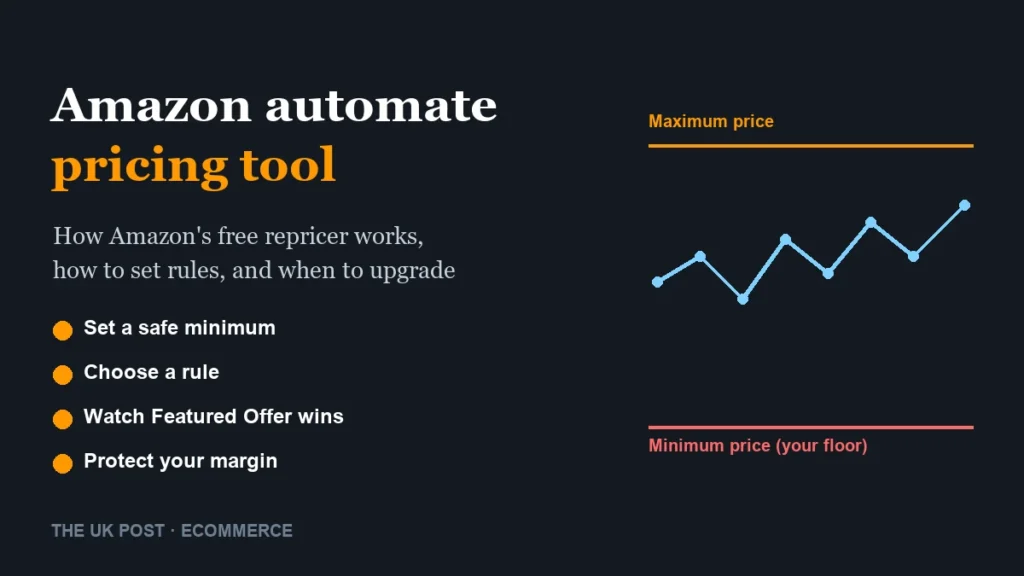
Short answer: Amazon’s “Automate Pricing” is a free repricing tool built into Seller Central for sellers on the Professional plan. You choose a pricing rule, for example matching or beating the Featured Offer (the “Buy Box”) or the lowest price, set a minimum and an optional maximum price for each product, and Amazon then changes your prices automatically within those limits, around the clock. It is a sensible starting point for most UK sellers. Its biggest risk is a minimum price set too low, so work out your true floor price first, including Amazon fees, VAT and your own costs. If you sell large catalogues or need smarter, profit-based repricing, a paid third-party repricer may do better.
What Amazon Automate Pricing Does
On Amazon, many sellers often offer the same product, and the one shown in the Featured Offer box wins most sales. Prices change constantly, so adjusting them by hand is impossible for most sellers. Automate Pricing watches the market and moves your price according to the rules you set, without going below your minimum or above your maximum.
- Cost: free with the Professional selling plan.
- Where: in Seller Central, under the Pricing menu.
- Scope: rules can be applied to individual SKUs or in bulk, and across marketplaces such as Amazon.co.uk and EU stores.
- Directions: rules can raise prices as well as lower them.
- Reporting: you can see how automated pricing affects your Featured Offer win rate.
The Main Rule Types
| Rule | What it does | Good for |
|---|---|---|
| Competitive Featured Offer | Matches, beats or stays a set amount above the current Featured Offer price | Resellers competing for the Buy Box on shared listings |
| Competitive lowest price | Tracks the lowest offer, optionally filtered by condition or fulfilment method | Commodity products where price is everything |
| Sales-based | Changes price depending on how many units sell over a period | Clearing slow stock or raising prices on fast sellers |
| Prices on other stores or marketplaces | Keeps prices aligned across Amazon marketplaces | Sellers trading in the UK and EU |
Amazon updates rule options from time to time, so check the current list in Seller Central. Whatever rule you use, the minimum and maximum prices are the safety rails.
How to Set It Up
Automating Amazon prices safely in six steps
- Open Pricing > Automate Pricing in Seller Central.
- Create a rule: choose the type and how you want to respond (match, beat by a set amount or stay above).
- Pick the marketplaces where the rule applies.
- Add SKUs one by one or in bulk with a file upload.
- Set minimum and maximum prices for every SKU.
- Start the rule and watch results for the first few days.
Getting the Minimum Price Right
Your minimum price is the most important number in automated repricing. Set it too low and a price war can push you into selling at a loss, automatically and at scale. Calculate it from your real costs:
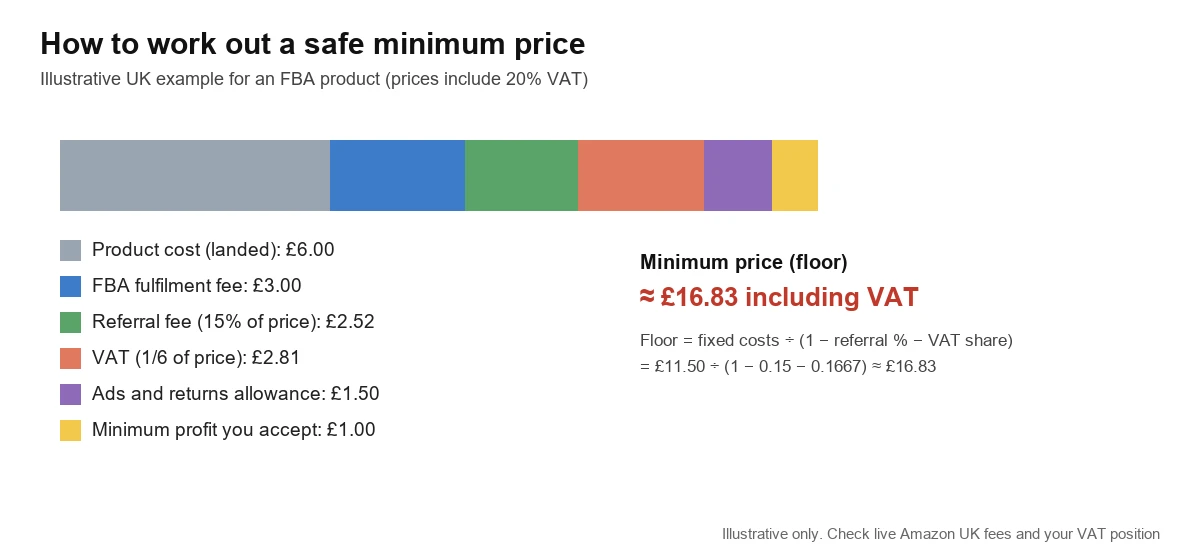
- Landed product cost: what each unit costs you, including shipping and import duty.
- Amazon fees: the referral fee (a percentage of the selling price, most categories between 8% and 15%) and, for FBA, the fulfilment fee and storage costs.
- VAT: UK consumer prices on Amazon include VAT. If you are VAT-registered, one-sixth of a standard-rated price is VAT, not income.
- Advertising, returns and refunds: allow a realistic amount per unit.
- Minimum profit: what you need to make each sale worthwhile.
Because referral fees and VAT rise and fall with the price, solve for the floor rather than simply adding costs together. Amazon’s own revenue calculator helps you check.
Amazon Automate Pricing vs Third-Party Repricers
| Automate Pricing | Third-party repricers | |
|---|---|---|
| Cost | Free with Professional plan | Monthly subscription |
| Set-up | Simple, inside Seller Central | Separate app connected to your account |
| Strategy | Rule-based | Often algorithmic or “AI” models that aim for profit, not just lowest price |
| Competitor filters | Basic | Detailed (exclude certain sellers, ratings, fulfilment types) |
| Speed | Regular automatic changes | Some advertise near real-time repricing |
| Best for | Most small and medium sellers | Large catalogues, competitive categories, multi-channel sellers |
Well-known repricers include Repricer.com, BQool, Aura, Informed.co and Seller Snap. Prices and features change, so use free trials and compare results against Amazon’s own tool before paying.

Rules and Pitfalls
- Amazon’s Fair Pricing Policy: Amazon may remove offers it considers unfairly high compared with recent prices. Your maximum price helps you stay within reasonable limits.
- Price error safeguards: prices outside Amazon’s reference ranges can be suppressed until you fix them.
- Race to the bottom: if every seller automatically undercuts, margins vanish. Rules that match or stay slightly above the Featured Offer can protect profit, especially if you have strong ratings or Prime delivery.
- UK consumer law: automated prices must still be accurate and not misleading. Avoid fake “was” prices and hidden charges.
- Stock levels: pricing low when stock is nearly out can sell your last units too cheaply; consider raising prices as stock runs down.
My advice: start with Amazon’s free tool on a handful of products, set minimums from a proper cost calculation, and compare a month of results with your manual pricing. Only pay for a third-party repricer if you can see what extra profit it would bring.
New to selling on Amazon? Our guide to how Amazon FBA works explains fees and logistics, and our list of the best things to sell online can help you choose products. If you make your own goods, our guide to cost estimating shows a disciplined way to price from costs up.
Frequently Asked Questions
What is Amazon’s Automate Pricing tool?
A free tool in Seller Central that changes your prices automatically, based on rules you set, within your minimum and maximum prices.
Is Amazon Automate Pricing free?
Yes, for sellers on the Professional selling plan.
Does Automate Pricing work on Amazon UK?
Yes. You can apply rules on Amazon.co.uk and, if you sell there, other Amazon marketplaces.
Will it help me win the Buy Box?
It can, by keeping your price competitive with the Featured Offer, but Amazon also weighs delivery speed, seller performance and stock.
How do I set my minimum price?
Add your landed cost, Amazon fees, VAT if registered, advertising and returns allowance and minimum profit, and solve for the price that covers them all.
Can Automate Pricing raise my prices?
Yes. Rules can increase prices when competition eases, up to your maximum.
Is a third-party repricer better?
For large catalogues or highly competitive categories, often. For most smaller sellers, Amazon’s free tool is a good place to start.
Can automated pricing break Amazon’s rules?
Prices that are unusually high can breach Amazon’s Fair Pricing Policy, and prices outside reference ranges can be suppressed. Sensible minimums and maximums help.
Do UK Amazon prices include VAT?
Yes. Prices shown to UK consumers include VAT, which matters when you calculate your floor price.
How often does Amazon change prices with Automate Pricing?
Automatically and regularly as the market changes, within your limits; check rule activity in Seller Central.
Final Thoughts
Amazon’s Automate Pricing tool takes the grind out of repricing and costs nothing on the Professional plan. Its value depends entirely on the limits you give it, so calculate a proper floor price, choose rules that protect margin, and review results regularly. Move to a paid repricer only when the numbers show it will pay for itself.
Sources: Amazon Sell (Automate Pricing tool page and blog on pricing rules); Amazon Seller Central help and forums (UK and Europe); Amazon Selling Partner API documentation on automated pricing rules; Amazon statements on its Marketplace Fair Pricing Policy; GOV.UK guidance on VAT for online sellers; CMA and Trading Standards guidance on pricing practices.