
Amazon KDP (Kindle Direct Publishing) is Amazon’s free self-publishing service. It lets you publish and sell ebooks, paperbacks and hardcovers on Amazon without a publisher. It costs nothing to set up, but Amazon takes printing or delivery costs out of each sale before it pays your royalty.
You keep the rights to your book, set your own price and choose where it sells. Amazon prints paperbacks and hardcovers only when a customer orders one, so you never hold stock.
This guide is written for UK readers. It explains what KDP is, how it works, what it really costs, how royalties are calculated in pounds, and what to watch out for. Prices and rules were checked against Amazon’s KDP help pages on 10 November 2026.
Source: Amazon KDP, checked 10 November 2026. Figures are the maximum Amazon quotes and depend on price, format and marketplace.
In this guide
- What Is Amazon KDP (Kindle Direct Publishing)?
- What Can You Publish on Amazon KDP?
- How Does Amazon KDP Work?
- Is Amazon KDP Free to Use?
- How Much Does Amazon KDP Pay Authors?
- What Are Amazon KDP Printing Costs?
- What Is Amazon KDP Select?
- Amazon KDP vs KDP Select: What Is the Difference?
- What Are the Amazon KDP Requirements?
- What File Formats Does Amazon KDP Accept?
- Amazon KDP Content Guidelines and AI Rules
- Amazon KDP Taxes and Payments
- Can You Make Money With Amazon KDP?
- Is Amazon KDP Worth It?
- Amazon KDP Risks and Common Scams
- Amazon KDP Alternatives
- Frequently Asked Questions About Amazon KDP
- Final Thoughts: Is Amazon KDP Right for You?
What Is Amazon KDP (Kindle Direct Publishing)?
KDP stands for Kindle Direct Publishing. It is the self-publishing arm of Amazon. You upload your manuscript and cover, enter your book details, set a price, and Amazon lists the book in its stores. Amazon launched the service in November 2007, alongside the first Kindle, and added paperbacks in 2016 and hardcovers in 2021.
Amazon says KDP’s tools cover more than 10 countries and over 45 languages, and that books usually appear in Amazon stores within 72 hours of publishing. Readers buy your book on Amazon websites such as Amazon.co.uk. They read ebooks on Kindle devices or in the free Kindle app, and paperbacks and hardcovers arrive like any other Amazon order. If you are curious about that last step, our guide to what time Amazon delivers explains how delivery slots work.
Amazon states that publishing through KDP leaves you with full rights to your book. That is the main difference from a traditional deal, where the publisher usually controls rights, price and timing.
| Traditional publishing | Self-publishing with KDP | |
|---|---|---|
| Who pays for editing and design | The publisher | You do, if you choose to buy them |
| Upfront payment | Sometimes an advance | None. You earn royalties on sales |
| Rights and price control | Usually with the publisher | You keep your rights and set the price |
| Time to market | Often many months or years | Usually days once your files are ready |
| Bookshop reach | Strong | Mainly online. Wider reach needs extra steps |
What Can You Publish on Amazon KDP?
KDP supports three formats. Each has its own setup, files and costs.
Kindle eBooks
An ebook is a digital book. Readers get it on a Kindle device or the Kindle app on a phone or tablet. There is no printing cost, so ebooks are the cheapest format to publish. You can also update the file later if you spot an error.
Paperback Books
A paperback is a printed book with a soft cover. KDP uses print-on-demand, which means Amazon prints a copy only after someone orders it. You do not pay for a print run or store boxes of books. Paperbacks can have between 24 and 828 pages, depending on ink type.
Hardcover Books
Hardcovers have a rigid cover with the artwork printed on it. They work the same way as paperbacks but cost more to produce. A hardcover needs at least 75 pages and no more than 550, and KDP’s top list price is £250 on Amazon.co.uk. Hardcovers cannot be put into Expanded Distribution.
Can You Publish Multiple Formats of the Same Book?
Yes. Many authors publish the ebook, paperback and hardcover of one title. Each format is set up separately, and print editions need their own ISBN. Amazon usually shows the formats as options on one product page, so readers can pick the one they want.
There is one pricing rule to know. To earn 70% on an ebook, its list price must be at least 20% below the Amazon list price of any physical edition of the same book.
| eBook | Paperback | Hardcover | |
|---|---|---|---|
| Main file type | EPUB, DOCX or KPF | Print-ready PDF | Print-ready PDF |
| Page limits | None stated | 24 to 828 | 75 to 550 |
| Identifier | ASIN (automatic) | ISBN (free or your own) | ISBN (free or your own) |
| Cost taken from each sale | Delivery fee (70% option only) | Printing cost | Printing cost |
| Royalty rates | 35% or 70% | 50% or 60% (40% Expanded Distribution) | 50% or 60% |
How Does Amazon KDP Work?
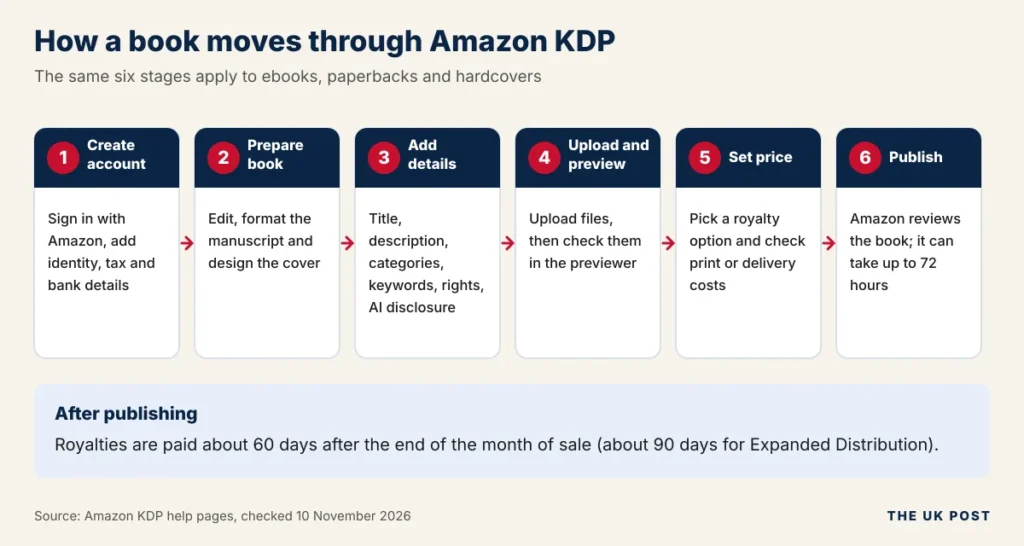
Publishing on KDP follows seven steps. The graphic below groups them into six stages, and each step is explained after it.
Step 1: Create an Amazon KDP Account
Go to the official KDP website and sign in with your Amazon account, or create one. You then add your author details, tax information and bank details. Amazon may also ask you to verify your identity with a photo ID.
Step 2: Prepare Your Book
Write and edit your manuscript, then format it for the file type you need. Software can catch typos, and our list of Grammarly alternatives covers tools that help, but a human proofreader still catches what software misses. Finally, create a cover. KDP offers a free Cover Creator tool for print covers, or you can upload your own PDF.
Step 3: Add Your Book Details
Enter the title, subtitle, author name and description. Choose categories and keywords so readers can find the book. Select your publishing territories and rights. Choose worldwide rights only for markets where you own the rights. You will also answer whether the book contains AI-generated content, covered later in this guide.
Step 4: Upload Your Manuscript and Cover
Upload your manuscript and cover files. KDP checks them against its file requirements and flags problems, such as images that are too small or text outside the margins.
Step 5: Preview Your Book
Use KDP’s previewer to see how pages look on a screen or in print. Check the layout, spelling and image placement, and fix errors before you publish. For print, ordering a proof copy is the safest way to see the finished book.
Step 6: Set Your Book Price
Pick a list price and a royalty option. KDP shows an estimate of what you will earn per sale. For print books, use Amazon’s Printing Cost and Royalty Calculator to check the printing cost before you commit to a price.
Step 7: Publish Your Book
Select publish and Amazon reviews your book. The book cannot go on sale until it is approved, and Amazon says titles typically appear in stores within 72 hours. Once it is live, you can track sales in your KDP reports. Royalties follow about 60 days after the end of the sales month.
Is Amazon KDP Free to Use?
Yes, with a clear limit. Creating an account is free, uploading a manuscript is free, and Amazon charges no upfront publishing fee. What Amazon does charge is taken from your sales:
- Printing costs on paperbacks and hardcovers, deducted from each copy sold.
- A delivery fee on the 70% ebook option, based on file size. It is £0.10 per MB on Amazon.co.uk and $0.15 per MB on Amazon.com.
- Proof and author copies, which you pay for at printing cost plus postage.
Then there are optional business costs that Amazon does not charge. These include editing, cover design, formatting, an ISBN you buy yourself and advertising. Free publishing does not mean a free business. Many authors spend several hundred pounds on editing and a cover before their first sale.
| Cost | Who charges it | When you pay |
|---|---|---|
| Account and upload | Nobody | Free |
| Printing cost | Amazon | Taken from each print sale |
| eBook delivery fee (70% option) | Amazon | Taken from each ebook sale |
| Editing, cover, formatting | Freelancers or tools | Before you publish, if you use them |
| Own ISBN (optional) | Nielsen (UK) | One-off purchase |
| Advertising (optional) | Amazon Ads or others | As your campaigns run |
How Much Does Amazon KDP Pay Authors?
It depends on the format, the price and the option you choose. Ebooks pay 35% or 70%. Paperbacks and hardcovers pay 50% or 60%, minus printing costs.
Amazon KDP 35% Royalty Option
With the 35% option you earn 35% of the list price, excluding VAT. No delivery fee is deducted. It works in every territory and across a wider price range. On Amazon.co.uk the range is £0.77 to £150, with higher minimums for larger files. Books made up mainly of public domain content can only use this option.
| eBook file size | Minimum price (Amazon.co.uk) | Maximum price |
|---|---|---|
| Under 3 MB | £0.77 | £150 |
| 3 MB to under 10 MB | £1.25 | £150 |
| 10 MB or more | £1.49 | £150 |
Amazon KDP 70% Royalty Option
The 70% option pays 70% of the list price, excluding VAT, minus the delivery fee. It applies only in Amazon’s list of eligible territories, which includes the UK and the US. Sales elsewhere pay 35%.
July 2026 update
On 7 July 2026 Amazon widened the 70% price band on Amazon.com from $2.99–$9.99 to $2.99–$12.99. Amazon says other marketplaces got equivalent changes, and its UK table now shows £1.77 to £12.99. If an older guide still says $9.99, it is out of date.
To use the 70% option your book must meet these conditions:
- Price inside the band for your marketplace: $2.99 to $12.99 on Amazon.com and £1.77 to £12.99 on Amazon.co.uk.
- List price at least 20% below the Amazon list price of any physical edition.
- Not mainly public domain content.
- Sales in an eligible territory. Brazil, Japan, Mexico and India pay 70% only for books enrolled in KDP Select.
Because the delivery fee comes off before the 70% is applied, bigger files earn less. A 10 MB ebook on Amazon.co.uk carries £1.00 of delivery cost, so at the lowest 70% price of £1.77 it would pay about £0.54, less than the £0.62 the 35% option pays. For image-heavy books, always compare both options.
Paperback and Hardcover Royalty Rates
Print royalties follow this formula: royalty rate × list price, minus printing cost. The rate is 50% below a price threshold and 60% at or above it. The threshold differs by marketplace.
| Marketplace | 50% rate applies | 60% rate applies |
|---|---|---|
| Amazon.co.uk | £7.98 or less | £7.99 or more |
| Amazon.com | $9.98 or less | $9.99 or more |
Printing costs are deducted after the rate is applied, so a higher page count or colour ink cuts your royalty. Hardcovers use the same 50% and 60% rates.
Expanded Distribution is an optional setting that makes your paperback available to bookshops, libraries and other retailers outside Amazon. Its royalty is only 40% of the list price, minus printing cost, and payments come about 90 days after the sales month.
Amazon KDP Royalty Calculation Examples
These are illustrative examples using Amazon’s published formulas. They are not guaranteed earnings.
Ebook example. You price a 1 MB ebook at £4.99 on Amazon.co.uk. With the 70% option, you earn 70% of (£4.99 minus £0.10 delivery), which is £3.42. With the 35% option you would earn £1.75.
Ebook royalty per sale: 35% vs 70% option
View this chart as a table
| List price | 35% option | 70% option |
|---|---|---|
| £2.99 | £1.05 | £2.02 |
| £4.99 | £1.75 | £3.42 |
| £7.99 | £2.80 | £5.52 |
| £9.99 | £3.50 | £6.92 |
| £12.99 | £4.55 | £9.02 |
Paperback example. You price a 300-page black-ink paperback at £9.99 on Amazon.co.uk. The printing cost is £0.85 plus 300 pages at £0.010, which is £3.85. At the 60% rate, 60% of £9.99 is £5.99, so your royalty is £2.14.
Where the money goes on a £9.99 paperback
View this chart as a table
| Part of the price | Amount | Share |
|---|---|---|
| Your royalty | £2.14 | 21.5% |
| Amazon’s 40% share | £4.00 | 40.0% |
| Printing cost | £3.85 | 38.5% |
Sold through Expanded Distribution, the same book pays 40% of £9.99 (£4.00) minus £3.85, which leaves only £0.15. That gap is why many authors keep Expanded Distribution off unless they need it.
What Are Amazon KDP Printing Costs?
Printing cost is a fixed cost plus a per-page cost. In formula form: fixed cost + (page count × per-page cost). Amazon deducts it from every print sale. It depends on:
- Number of pages. More pages mean a higher cost, except in the lowest page bands where only a flat fixed cost applies.
- Ink type. Black ink is the cheapest. Standard and premium colour cost much more per page.
- Book format. Hardcovers have a higher fixed cost than paperbacks.
- Trim size. Paperbacks are grouped as regular trim (up to 6.12 × 9 inches) or large trim, and large trim costs more per page. Hardcover cost also depends on trim size. Bleed settings and cover finish do not change paperback cost.
- Amazon marketplace. The cost depends on where the customer orders. The same book costs different amounts on Amazon.co.uk and Amazon.com.
What it costs to print one paperback in the UK
View this chart as a table
| Pages | Black ink | Standard colour | Premium colour |
|---|---|---|---|
| 100 | £1.93 | £2.85 | £5.20 |
| 150 | £2.35 | £3.85 | £7.37 |
| 200 | £2.85 | £4.85 | £9.55 |
| 250 | £3.35 | £5.85 | £11.72 |
| 300 | £3.85 | £6.85 | £13.90 |
| 350 | £4.35 | £7.85 | £16.07 |
| 400 | £4.85 | £8.85 | £18.25 |
| Paperback (Amazon.co.uk) | Pages | Regular trim | Large trim |
|---|---|---|---|
| Black ink | 24 to 110 | £1.93 flat | £2.15 flat |
| Black ink | 110 to 828 | £0.85 + £0.010 per page | £0.85 + £0.012 per page |
| Standard colour | 72 to 600 | £0.85 + £0.020 per page | £0.85 + £0.027 per page |
| Premium colour | 24 to 40 | £2.59 flat | £3.24 flat |
| Premium colour | 42 to 828 | £0.85 + £0.0435 per page | £0.85 + £0.0598 per page |
| Hardcover (Amazon.co.uk) | Pages | Regular trim | Large trim |
|---|---|---|---|
| Black ink | 75 to 108 | £5.23 flat | £5.45 flat |
| Black ink | 110 to 550 | £4.15 + £0.010 per page | £4.15 + £0.012 per page |
| Premium colour | 75 to 550 | £4.15 + £0.045 per page | £4.15 + £0.060 per page |
Printing cost sets your lowest workable price. Divide the printing cost by the royalty rate to find the price where you earn nothing. For the 300-page paperback above, prices below £7.99 pay at 50%, so the break-even price is £3.85 ÷ 0.50 = £7.70. At £7.99 the 60% rate starts and the royalty jumps to £0.94. Amazon updates these tables from time to time, so run your own book through the official Printing Cost and Royalty Calculator before you set a price.
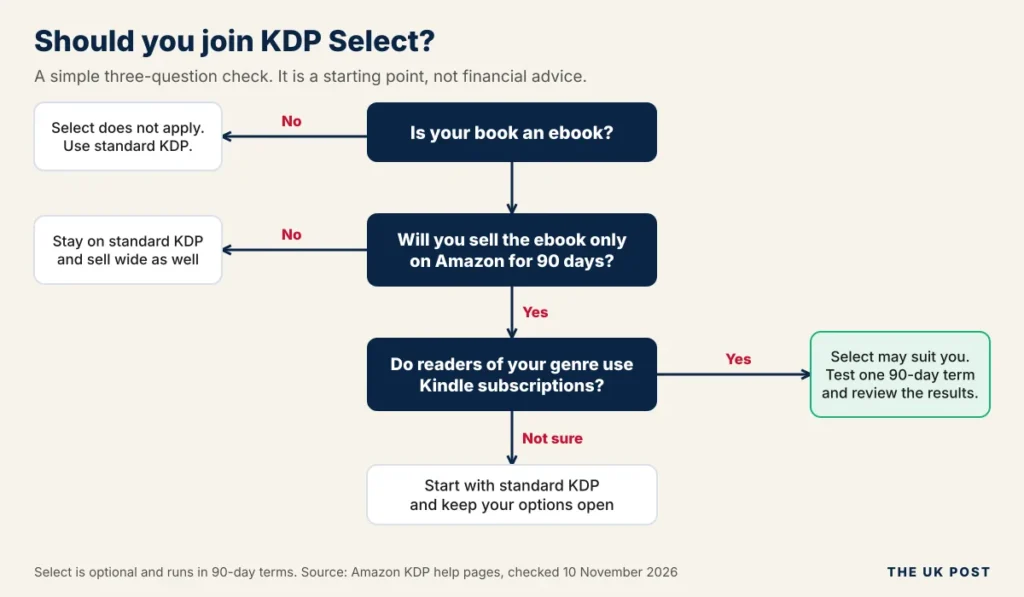
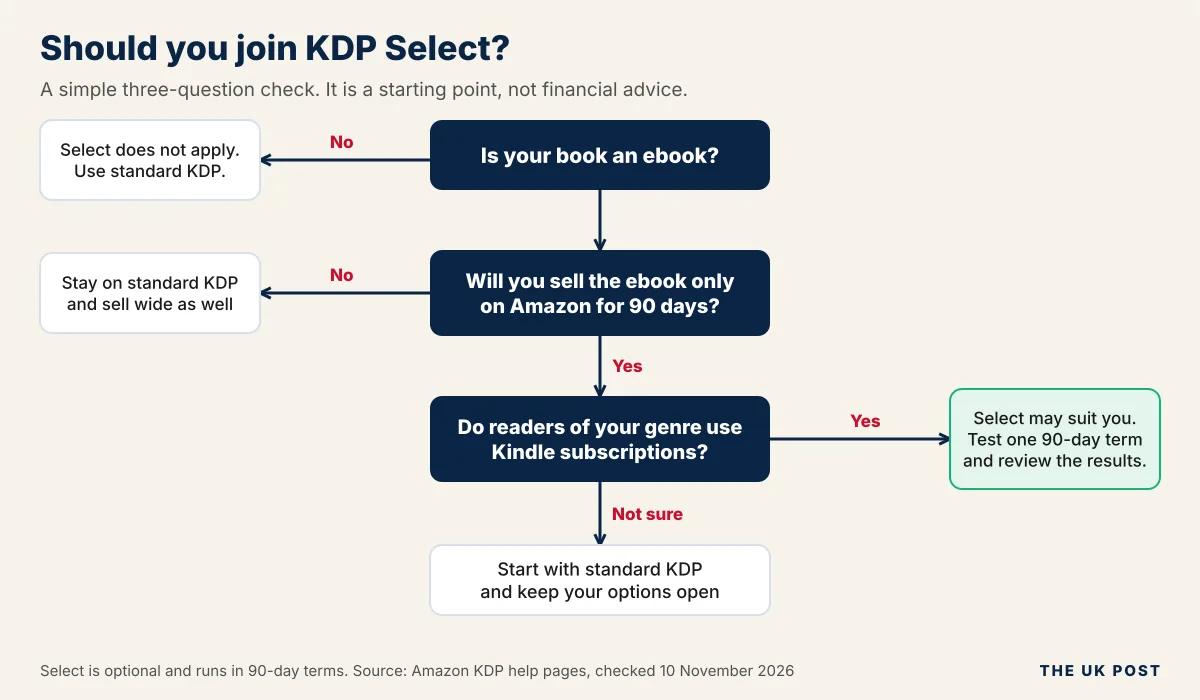
What Is Amazon KDP Select?
KDP Select is an optional programme for Kindle ebooks. Amazon describes it as free. You enrol a title for a 90-day term, and in return the ebook gains extra ways to earn and promote. Amazon says you can cancel within three days of the start date. After that, you must contact KDP support.
The trade-off is exclusivity. While a title is enrolled, its digital edition must be sold only on Amazon. Paperbacks and hardcovers can still be sold elsewhere. Enrolled ebooks are included automatically in Kindle+, the subscription service that many authors and readers still call Kindle Unlimited.
Authors earn from Kindle+ through page reads. Amazon pays a share of the monthly KDP Select Global Fund based on the pages subscribers read. Amazon’s KDP home page states that total Kindle+ author earnings were $69.3 million for September 2026. The per-page rate changes every month, and independent trackers put it at roughly $0.004 to $0.005 per page.
Select also unlocks promotional tools. These include Free Book Promotions and Kindle Countdown Deals. Countdown Deals only run on Amazon.com and Amazon.co.uk. Select books also earn 70% in Brazil, Japan, Mexico and India, where non-Select books earn 35%.
Advantages
- Income from Kindle+ page reads
- Free and discounted promotions
- 70% royalty in four extra countries
- Can suit series and fast readers
Disadvantages
- No ebook sales on other stores for 90 days
- Page-read rate changes monthly
- Auto-renews unless you switch it off
- Little benefit for print-only books
Amazon KDP vs KDP Select: What Is the Difference?
Standard KDP is the publishing service itself. KDP Select is an add-on for ebooks. Every Select book is a KDP book, but not every KDP book is in Select.
| Standard KDP | KDP Select | |
|---|---|---|
| Meaning | Amazon’s self-publishing service | Optional 90-day programme for Kindle ebooks |
| Publishing formats | Ebook, paperback, hardcover | Ebook only |
| Exclusivity | None. Sell anywhere | Ebook sold only on Amazon during enrolment |
| Kindle Unlimited (Kindle+) eligibility | No | Yes, automatically |
| Royalty options | Ebook 35% or 70%; print 50% or 60% | Same, plus page-read earnings and 70% in four extra countries |
| Promotional features | Standard price controls | Free Book Promotions and Kindle Countdown Deals |
| Publishing flexibility | Full | Limited for ebooks during each 90-day term |
What Are the Amazon KDP Requirements?
Account Requirements
- Amazon account. Use an existing one or create a new one during sign-up.
- Age. KDP’s terms say you must be at least 18, or the age of majority where you live if that is higher. Younger authors need a parent or guardian involved.
- Identity. Amazon is rolling out identity checks, so you may be asked to upload a photo ID. Your KDP account name should match your legal identity. A pen name goes in the author field.
- Tax and bank details. You complete a tax interview and add a bank account for royalties.
- Country. Availability depends on your residence and the payment options Amazon offers there. UK authors can publish and are paid directly into UK bank accounts.
Book Requirements
- Content that is yours, or that you have the right to publish.
- Accurate book details. Misleading titles or descriptions can lead to rejection.
- Manuscript and cover files that meet KDP’s specifications.
- Public domain books are allowed, but not plain copies of titles that are already free in the store.
You own the copyright in your own work automatically. For general guidance, see the UK government copyright guide or the US Copyright Office.
ISBN and ASIN Requirements
An ISBN is a 13-digit number that identifies one edition of a book. An ASIN is Amazon’s own 10-character product code.
- Ebooks do not need an ISBN. Amazon assigns an ASIN automatically.
- Paperbacks and hardcovers need an ISBN. KDP offers a free one, which is only valid for KDP and is not available for ebooks.
- Your own ISBN lets you use the same number on other platforms and choose your publisher name. In the UK you buy ISBNs from Nielsen. At the time of checking a single ISBN cost £93 and a pack of ten cost £174, including VAT.
What File Formats Does Amazon KDP Accept?
Ebook File Formats
| Format | Status for ebooks | Notes |
|---|---|---|
| EPUB | Accepted | Must meet Kindle Publishing Guidelines. Amazon recommends checking it in Kindle Previewer |
| DOC and DOCX | Accepted | Most files convert well. Complex layouts may not |
| KPF | Accepted | Created with Amazon’s Kindle Create. Amazon presents it as a way to avoid formatting problems |
| HTML, RTF, TXT | Accepted | HTML can be uploaded as a ZIP, HTM or HTML file |
| Accepted in some languages | English, French, German, Italian, Portuguese, Spanish, Catalan, Galician and Basque | |
| MOBI | No longer accepted for fixed-layout ebooks | Since March 2025. Amazon points to EPUB, KPF or DOCX instead |
Paperback and Hardcover File Formats
For print, a print-ready PDF is the standard choice. KDP also lists DOC, DOCX, RTF, HTML and TXT for books without bleed, but PDF keeps your layout fixed and avoids surprises. Your cover can be made with Cover Creator or uploaded as a PDF.
EPUB vs MOBI vs PDF
- EPUB is a flexible ebook format whose text adjusts to the screen. It suits most ebooks.
- MOBI is an older Kindle format. Amazon no longer accepts it for fixed-layout ebooks, so use EPUB or KPF.
- PDF keeps pages exactly as designed. It is the right choice for print books, but it is a limited choice for ebooks.
Amazon KDP Content Guidelines and AI Rules
What Content Can You Publish?
KDP accepts fiction, non-fiction, educational books and children’s books. It also allows journals and other low-content books, as long as they follow Amazon’s separate low-content rules and give readers a real product, not filler.
What Content Is Not Allowed?
- Illegal or infringing content, including copyrighted material you do not have permission to publish.
- Offensive content such as hate speech, pornography and material that promotes child abuse or terrorism.
- Poor customer experience, including misleading descriptions and books that do not match their listing.
- Companion books such as summaries or study guides of copyrighted works, outside the US, without the copyright holder’s written permission.
Amazon enforces these rules with machine learning, automation and human reviewers. It can reject or remove a book, and authors can appeal removals.
Can You Use AI to Write Books on Amazon KDP?
Yes, but you must tell KDP when a book includes AI-generated content. The rules draw a line between two things:
- AI-generated means an AI tool created the text, images or translation. It stays AI-generated even if you edit it heavily. You must disclose it when you publish a new book or republish an edited one.
- AI-assisted means you created the content and used AI only to edit, refine, error-check or brainstorm. You do not need to disclose this.
Disclosure does not replace the other rules. You remain responsible for making sure all AI-generated or AI-assisted content meets the content guidelines, including intellectual property rules. If you are choosing an assistant, our comparison of Grok vs Gemini shows how two popular options differ.
Amazon KDP Taxes and Payments
How Do Amazon KDP Payments Work?
Royalties are paid monthly, about 60 days after the end of the month in which the sale was reported. Expanded Distribution takes about 90 days. A sale in January is therefore paid at the end of March.
- Direct deposit (EFT) is the usual route. It has no minimum on Amazon.co.uk and appears in your bank within 1 to 5 business days of the payment date.
- Wire and cheque payments have a £100 minimum on Amazon.co.uk where offered, and KDP no longer issues cheques to new UK accounts.
- Separate marketplaces. Royalties build up separately for each Amazon store, so you may get several payments a month.
- Currency. If your payment currency differs from the sale currency, Amazon converts at its own exchange rate.
Does Amazon KDP Charge Tax?
Amazon does not charge you tax for publishing, but you must complete a tax interview. It decides how much US tax Amazon withholds from US sales. Non-US individuals complete the W-8BEN route in the interview, and companies use the W-8BEN-E.
The UK has a tax treaty with the US, and authors who claim it correctly are commonly reported to have 0% US tax withheld on royalties. Without a valid form, withholding can be as high as 30%. Check the rate shown in your own interview, because treaty terms depend on your country and tax status.
Separately, KDP income may be taxable in the UK. HMRC’s trading allowance covers up to £1,000 of gross trading income a year. If you earn more, you may need to register for Self Assessment. Read the GOV.UK guidance on trading allowances or speak to an accountant. This article is general information, not tax advice.
Amazon KDP in India and the UK
Both countries have local Amazon stores and local bank payments, but the details differ.
| UK authors | Indian authors | |
|---|---|---|
| Local store | Amazon.co.uk (GBP) | Amazon.in (INR) |
| 70% ebook band | £1.77 to £12.99 | ₹99 to ₹599, and only for KDP Select books |
| Direct deposit speed | 1 to 5 business days | 7 to 10 business days |
| Wire and cheque | £100 minimum; no cheques for new accounts | Wire with $100 minimum; no cheques |
| US tax form | W-8BEN, with UK treaty benefits | W-8BEN; treaty rates differ |
| Where to check | KDP UK help pages | KDP help pages and a local tax adviser |
Can You Make Money With Amazon KDP?
Yes, some authors do, but KDP does not guarantee sales or income. Amazon explains how royalties work. It does not promise that any book will sell.
Earnings depend on several things:
- Book quality. Editing, cover and description decide whether readers buy and finish.
- Genre and reader demand. Some genres have far more paying readers than others.
- Pricing. Price affects both sales and the royalty rate you earn.
- Competition. Bowker data, as reported by Publishers Weekly, counted about 3.5 million self-published ISBN titles in the US in 2025, up 38.7% on the year.
- Marketing. Visibility rarely happens on its own. Our roundups of marketing statistics and the best time to post on TikTok can help you plan promotion.
- Number of books. A back catalogue gives readers more to buy.
The best independent data comes from the Alliance of Independent Authors (ALLi). Its 2025 survey found a median income of $13,500 for committed independent authors, who spend more than half their working time writing. That is a median for a dedicated group, not a promise for newcomers, and many part-time authors earn much less.
Median yearly income of committed independent authors
View this chart as a table
| Group | Median annual income (USD) |
|---|---|
| Self-published, 2022 | $12,749 |
| Self-published, 2025 | $13,500 |
| Traditionally published | $6,000 to $8,000 |
Consider a simple break-even example. If you spend £800 on editing, a cover and formatting, and earn £2.14 per paperback as in our example above, you need about 374 sales to cover those costs. That figure excludes advertising and your time, and it is illustrative only. Compare this with other routes in our guide to the best things to sell online if you want to weigh up options.
Be sceptical of claims about fixed monthly income. Amazon does not publish an average author income, and the UK Advertising Standards Authority has stated that earnings claims in ads must be backed by evidence of typical results.
Is Amazon KDP Worth It?
It is worth it if you value control and low upfront cost more than guaranteed results. Here is how the pros and cons stack up.
Advantages of Amazon KDP
- Free publishing setup with no upfront fee.
- Access to Amazon marketplaces across many countries.
- Print-on-demand means no stock to buy or store.
- You control price, rights and publishing schedule.
- Ebook, paperback and hardcover from one dashboard.
Disadvantages of Amazon KDP
- High competition from millions of other titles.
- No guaranteed sales.
- Printing and delivery costs reduce your royalty.
- Marketing may need extra spending.
- Strict content and quality rules.
- Account and compliance risk if you break the rules.
Who Should Use Amazon KDP?
- First-time authors who want to learn publishing at low cost.
- Independent writers and self-publishers who want control.
- Educators and experts who create guides, workbooks or courses in book form.
- Authors who want to test a book idea without ordering a large print run.
Amazon KDP Risks and Common Scams
Why Can an Amazon KDP Account Be Closed?
Amazon can reject or remove books and can act against accounts that break its rules. Authors and industry sites most often report these triggers:
- Copyright violations, including copying other people’s work.
- Content guideline violations.
- Misleading titles, categories or keywords.
- Review manipulation, such as paid or fake reviews.
- Repeated quality problems or duplicate books.
How to Avoid Amazon KDP Publishing Scams
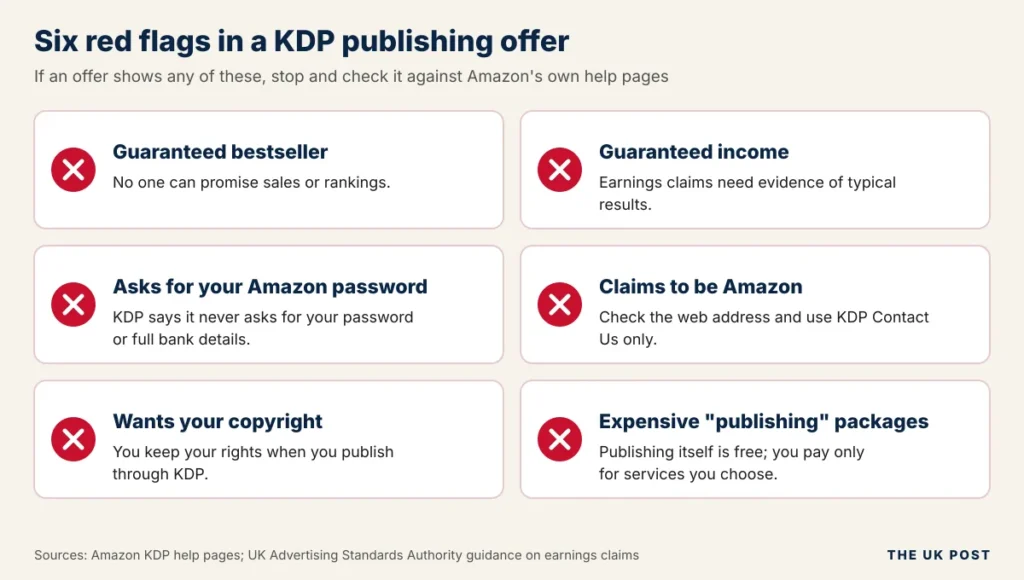
Scammers target new authors, often by pretending to be Amazon. Amazon says KDP will never ask for your Amazon password or full banking details outside your own account.
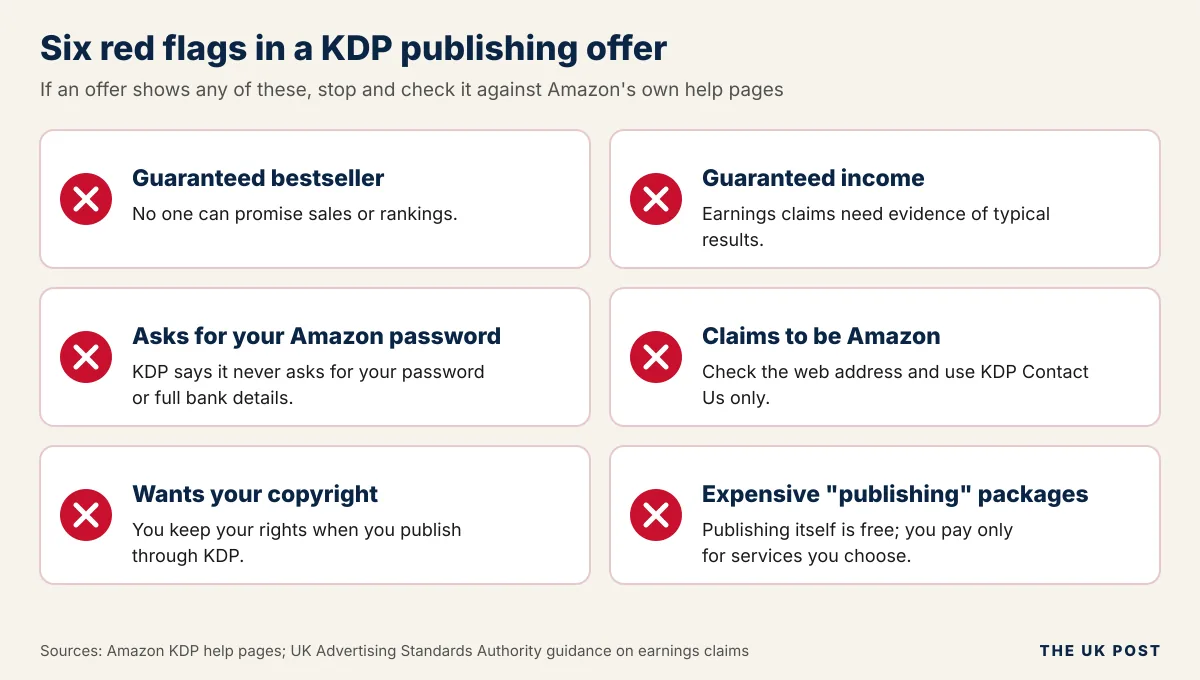
- Treat guaranteed income or bestseller promises as a warning sign. The UK ASA expects earnings claims to be backed by evidence.
- Read every contract before you sign, and never hand over your copyright.
- Never share your password with a service you have not verified.
- Question expensive packages. Publishing on KDP itself is free.
- Check that a company really is connected to Amazon by going to kdp.amazon.com yourself.
The ASA’s guidance on money-making courses is a useful read before you buy any publishing course.
What Should You Do If Your KDP Account Is Suspended?
- Read the official notification and note the policy it names.
- Check your book against that policy.
- Gather proof such as source files, permissions or licences.
- Reply through KDP’s official support and appeal channels.
- Ignore anyone who guarantees to get your account back.
Amazon KDP Alternatives
KDP is not your only route. These are the two most common alternatives. Platform fees change often, so confirm the current terms on each official site.
IngramSpark
IngramSpark is a print-on-demand and distribution service aimed at getting books into bookshops and libraries. Its royalty depends on the wholesale discount you set, and recent reports say it adds a 1.875% fee on print sales from February 2026 and has dropped title setup fees.
Draft2Digital
Draft2Digital is an ebook distributor that sends your book to many stores from one dashboard, and it also offers print. It takes a commission, reported at 10% of the retail price, and recent reports mention a small activation fee for new accounts.
A third option is selling directly. Our guide to the best ecommerce platforms covers tools for running your own shop, and our ThriveCart review looks at a checkout tool popular with digital sellers.
Amazon KDP vs Other Self-Publishing Platforms
| Amazon KDP | IngramSpark | Draft2Digital | |
|---|---|---|---|
| Main purpose | Sell on Amazon | Wide print distribution | Wide ebook distribution |
| Formats | Ebook, paperback, hardcover | Print and ebook | Ebook and print |
| Upfront cost | None | Reported none for titles | Reported small activation fee |
| Royalty or fee | 35% or 70% ebook; 50% or 60% print | Set by wholesale discount, plus a distribution fee | Reported 10% of retail price |
| Exclusivity | None unless you join KDP Select | None | None |
Frequently Asked Questions About Amazon KDP
What does Amazon KDP stand for?
KDP stands for Kindle Direct Publishing.
What is Amazon KDP used for?
Authors and publishers use it to publish and sell ebooks, paperbacks and hardcovers on Amazon.
Is Amazon KDP completely free?
It is free to join and publish. Amazon deducts printing costs on print books and a delivery fee on the 70% ebook option, and any editing or cover design is your own cost.
Can beginners use Amazon KDP?
Yes. KDP has guided setup, free tools such as Cover Creator and Kindle Create, and previewers. The harder parts are quality, pricing and getting noticed.
Do I need to buy an ISBN for Amazon KDP?
Not for ebooks, which get a free ASIN. For paperbacks and hardcovers you can use KDP’s free ISBN or buy your own, for example from Nielsen in the UK.
Do I own the copyright to my KDP book?
Yes. You own the copyright in your own work, and Amazon states that publishing through KDP leaves you with full rights.
How long does it take for a KDP book to go live?
Amazon says books appear in its stores within 72 hours of publishing.
How much money can you make from Amazon KDP?
There is no set figure. ALLi’s 2025 survey reported a $13,500 median for committed independent authors, but results vary widely and Amazon guarantees nothing.
Can I publish on Amazon KDP from India?
Yes. You use a standard KDP account, complete the tax interview and add a bank account. Direct deposits to Indian banks can take 7 to 10 business days after the payment date, and the 70% option on Amazon.in applies only to KDP Select books.
Can I publish the same book on other platforms?
Yes, unless the ebook is enrolled in KDP Select. Print editions can be sold elsewhere even when the ebook is in Select.
Is KDP Select compulsory?
No. It is an optional 90-day programme for ebooks.
Can I publish AI-generated books on Amazon KDP?
Yes, but you must disclose AI-generated text, images or translations. The book must still follow all content guidelines. AI-assisted editing does not need disclosure.
Does Amazon KDP accept MOBI files?
Amazon no longer accepts MOBI for fixed-layout ebooks. Use EPUB, KPF or DOCX instead.
Can I publish both ebooks and paperbacks?
Yes. You can publish an ebook, a paperback and a hardcover of the same book, each set up as its own format.
Why does Amazon KDP reject books?
Common reasons include formatting errors, content that breaks the guidelines, misleading details, copyright issues or poor quality. The rejection message names the problem.
Can I remove or unpublish my book from KDP?
You can unpublish it from your Bookshelf, which stops new copies selling. Existing ebook buyers keep their copy, and third parties may still sell used print copies. You can only delete a book that was never published and has no ISBN.
Final Thoughts: Is Amazon KDP Right for You?
Amazon KDP gives authors a free, flexible way to publish ebooks, paperbacks and hardcovers and keep their rights. Publishing costs nothing, but printing, delivery and your own editing and marketing costs are real.
Results depend on book quality, correct formatting and following Amazon’s rules. Before you publish, check the official KDP help pages for your marketplace, because prices and policies change.
Last Verified: November 2026
Sources and Further Reading
- Amazon Kindle Direct Publishing
- Amazon KDP Help Centre
- Amazon KDP Content Guidelines
- Amazon KDP digital book royalties and pricing and print royalties
- Amazon KDP paperback printing costs
- Alliance of Independent Authors (ALLi)
- UK Advertising Standards Authority: money-making courses
- GOV.UK: trading allowance
- US Copyright Office
This article is general information and not tax, legal or financial advice. Check current rules with Amazon and a qualified adviser.